Pattern Keeper alternative for iPhone & iPad
If you have ever stitched with Pattern Keeper on an Android phone and then moved to iPhone, you know the frustration: the app that defined digital chart tracking simply is not on the App Store. This page lays out, honestly, what StitchCraft does and does not cover as a replacement, so you can decide in two minutes whether it fits your workflow.
Pattern Keeper vs StitchCraft at a glance
| Pattern Keeper | StitchCraft | |
|---|---|---|
| Platform | Android only | iPhone and iPad (iOS 18.6+) |
| Import purchased PDF charts | Yes, its core feature | No |
| Create patterns from photos | No | Yes, four-step wizard with DMC color mapping |
| Design patterns from scratch | No | Yes, full editor with backstitch and flood fill |
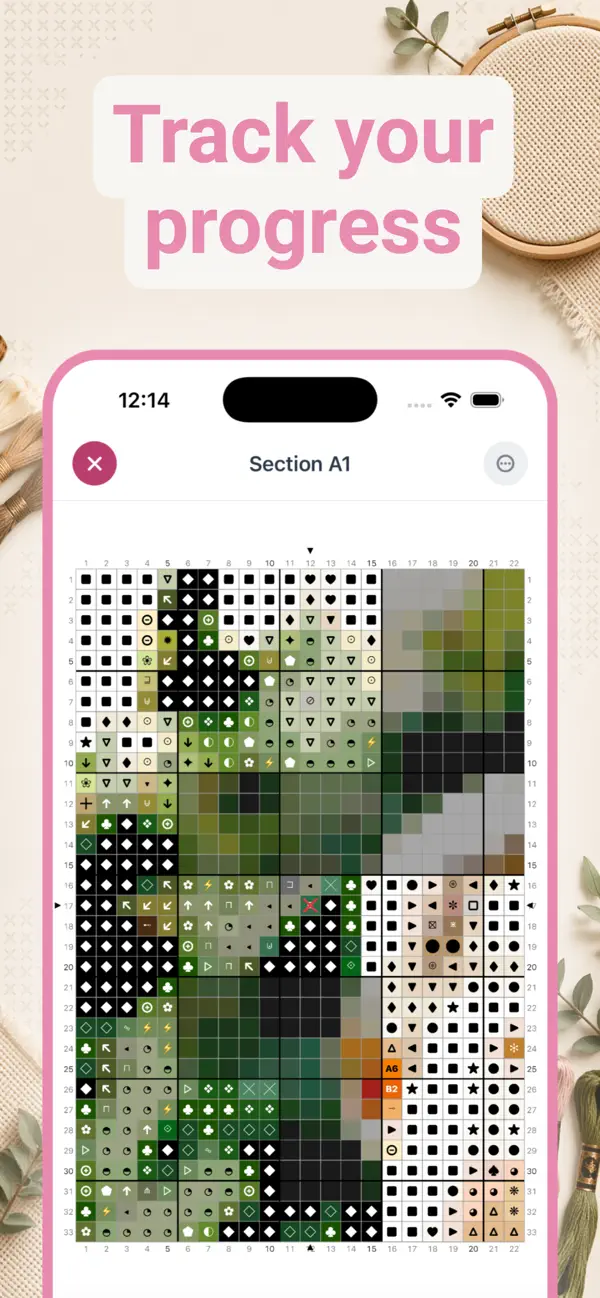
| Stitch-by-stitch progress tracking | Yes | Yes, with completion stats and sections |
| Real DMC thread library | Follows the chart's legend | 523 official DMC colors built in |
| Export print-ready PDF charts | No, it reads them | Yes, with legend and shopping list |
| Works offline, no account | Yes | Yes |
| Price | Paid app | Free to download, optional Premium |
Pattern Keeper is a third-party Android app; details reflect its publicly documented feature set. StitchCraft is not affiliated with Pattern Keeper.
The honest part: PDF chart import
Pattern Keeper's signature feature is parsing a purchased PDF chart into a tappable, trackable grid. StitchCraft does not do that, and no page of ours will pretend otherwise. If your entire library consists of purchased PDF patterns and you want them parsed symbol by symbol on iOS, a dedicated PDF chart reader is the tool to look for.
What StitchCraft replaces is the rest of the workflow, and for many stitchers that turns out to be the bigger half: making the pattern, mapping it to real DMC threads, stitching from a clean digital chart, and tracking every stitch. The pattern you generate in StitchCraft behaves exactly like a Pattern Keeper chart while you stitch: tap to mark, zoom to find your place, watch the percentage climb.
What StitchCraft gives you that Pattern Keeper never did
- Photo to pattern. Convert any photo into a stitch-ready chart with the photo to cross stitch wizard: pick grid size, limit colors, fine-tune, generate.
- A full pattern editor. Draw, erase, flood-fill, add backstitch outlines, and swap any DMC color across the whole pattern in one tap. See how to create your own pattern.
- Real DMC colors everywhere. Every square maps to one of 523 official DMC codes, so the shopping list matches threads you can actually buy.
- PDF export. Generate the kind of chart Pattern Keeper reads: symbol grids, row numbers, color legend, skein counts, and fabric size recommendations.
- Progress tracking built in. The same tap-to-track flow, with sections for large charts and per-project completion stats. See the progress tracker in detail.
Who should switch, and who should wait
StitchCraft fits you if you stitch your own designs or photo conversions, you want one iOS app for the whole journey from image to finished piece, or you are starting fresh on iPhone or iPad and choosing a workflow now.
Keep looking if your projects are exclusively purchased PDF charts that must be parsed and tracked symbol by symbol. That specific feature has no perfect iOS equivalent, and we would rather say so than waste your download.
Frequently asked questions
Is Pattern Keeper available for iPhone or iPad?
No. Pattern Keeper is an Android app and there is no iOS version. iPhone and iPad stitchers need a different app for digital chart tracking.
What is the best Pattern Keeper alternative for iOS?
It depends on your workflow. If you want to create patterns from photos or from scratch and track them stitch by stitch, StitchCraft covers that whole flow on iPhone and iPad with real DMC colors. If you specifically need to import purchased PDF charts, look for a dedicated PDF chart reader instead.
Can StitchCraft import PDF patterns like Pattern Keeper?
No. StitchCraft does not parse purchased PDF charts. Instead, it generates patterns from photos or lets you design them from scratch, then tracks those patterns stitch by stitch and exports print-ready PDFs with DMC codes.
Does StitchCraft track progress like Pattern Keeper?
Yes. You tap stitches to mark them complete, see a live completion percentage, and work large charts section by section. Multiple works in progress each keep their own saved state.
Is StitchCraft free?
Yes, StitchCraft is free to download on the App Store, with no account and no internet needed. The free version creates up to three patterns per day with grids up to 80 stitches wide and 20 colors; Premium unlocks larger patterns, PDF export, and shopping lists.